
1. Which two functions are provided by the upper layers of the OSI model? (Choose two.)
• placing electrical signals on the medium for transmission
• initiating the network communication process
• encrypting and compressing data for transmission
• segmenting and identifying data for reassembly at the destination
• choosing the appropriate path for the data to take through the network
2. Which is a function of the transport layer of the OSI model?
• routes data between networks
• converts data to bits for transmission
• delivers data reliably across the network using TCP
• formats and encodes data for transmission
• transmits data to the next directly connected device
3. Which common Layer 1 problem can cause a user to lose connectivity?
• incorrect subnet mask
• incorrect default gateway
• loose network cable
• NIC improperly installed
4. Which three command line utilities are most commonly used to troubleshoot issues at Layer 3? (Choose three.)
• ping
• a packet sniffer
• Telnet
• ipconfig
• Traceroute
5. Which address is used by the router to direct a packet between networks?
• source MAC address
• destination MAC address
• source IP address
• destination IP address
6. What is the correct encapsulation order when data is passed from Layer 1 up to Layer 4 of the OSI model?
• bits, frames, packets, segments
• frames, bits, packets, segments
• packets, frames, segments, bits
• segments, packets, frames, bits
7. What are two goals of the ISP help desk? (Choose two.)
• conserving support resources
• network optimization
• competitive scalability
• customer retention
• sales of network services
8. In what two ways do Level 1 and Level 2 help desk technicians attempt to solve a customer's problems? (Choose three.)
• talking to the customer on the telephone
• upgrading hardware and software
• using various web tools
• making an onsite visit
• installing new equipment
• with remote desktop sharing applications
9. A customer calls the help desk about setting up a new PC and cable modem and being unable to access the Internet. What three questions would the technician ask if the bottom-up troubleshooting approach is used? (Choose three.)
• Is the NIC link light blinking?
• What is the IP address and subnet mask?
• Can the default gateway be successfully pinged?
• Is the network cable properly attached to the modem?
• Is the Category 5 cable properly connected to the network slot on the PC?
• Can you access your e-mail account?
10. A customer calls to report a problem accessing an e-commerce web site. The help desk technician begins troubleshooting using a top-down approach. Which question would the technician ask the customer first?
• Can you access other web sites?
• Is there a firewall installed on your computer?
• What is your IP address?
• Is the link light lit on your NIC card?
11. Which statement describes the process of escalating a help desk trouble ticket?
• The help desk technican resolves the customer problem over the phone and closes the trouble ticket.
• Remote desktop utilities enable the help desk technician to fix a configuration error and close the trouble ticket.
• After trying unsuccessfully to fix a problem, the help desk technician sends the trouble ticket to the onsite support staff.
• When the problem is solved, all information is recorded on the trouble ticket for future reference.
12. What are two functions of the physical layer of the OSI model? (Choose two.)
• adding the hardware address
• converting data to bits
• encapsulating data into frames
• signal generation
• routing packets
13. A customer calls the ISP help desk after setting up a new PC with a cable modem but being unable to access the Internet. After the help desk technician has verified Layer 1 and Layer 2, what are three questions the help desk technician should ask the customer? (Choose three.)
• What is your subnet mask?
• What is your IP address?
• Is the NIC link light blinking?
• Can you ping the default gateway?
• Is the network cable properly attached to the cable modem?
• Is the network cable correctly connected to the network port on the PC?
14. Which scenario represents a problem at Layer 4 of the OSI model?
• An incorrect IP address on the default gateway.
• A bad subnet mask in the host IP configuration.
• A firewall filtering traffic addressed to TCP port 25 on an email server.
• An incorrect DNS server address being given out by DHCP.
15. What are two basic procedures of incident management? (Choose two.)
• opening a trouble ticket
• using diagnostic tools to identify the problem
• surveying network conditions for further analysis
• configuring new equipment and software upgrades
• adhering to a problem-solving strategy
• e-mailing a problem resolution to the customer
16. Which level of support is supplied by an ISP when providing managed services?
• Level 1
• Level 2
• Level 3
• Level 4
17. What is the first step that is used by a help desk technician in a systematic approach to helping a customer solve a problem?
• identify and prioritize alternative solutions
• isolate the cause of the problem
• define the problem
• select an evaluation process
18. A network technician has isolated a problem at the transport layer of the OSI model. Which question would provide further information about the problem?
• Do you have a firewall that is configured on your PC?
• Do you have a link light on your network card?
• Is your PC configured to obtain addressing information using DHCP?
• What default gateway address is configured in your TCP/IP settings?
• Can you ping http://www.cisco.com?
19. An ISP help desk technician receives a call from a customer who reports that no one at their business can reach any websites, or get their e-mail. After testing the communication line and finding everything fine, the technician instructs the customer to run nslookup from the command prompt. What does the technician suspect is causing the customer's problem?
• improper IP address configuration on the host
• hardware failure of the ISR used to connect the customer to the ISP
• bad cables or connections at the customer site
• failure of DNS to resolve names to IP addresses
20. Which layers of the OSI model are commonly referred to as the upper layers?
• application, presentation, session
• application, session, network
• presentation, transport, network
• presentation, network, data link
• session, transport, network
Kamis, 04 November 2010

Rabu, 03 November 2010
CCNA Discovery 2 Module 1 Exam Answers Version 4.0
CCNA Discovery 2 Module 1 Exam Answers Version 4.0
1. Which two things can be determined by using the ping command? (Choose two.)
• the number of routers between the source and destination device
• the IP address of the router nearest the destination device
• the average time it takes a packet to reach the destination and for the response to return to the source
• whether or not the destination device is reachable through the network
• the average time it takes each router in the path between source and destination to respond
2. What are three main types of high-bandwidth connection options used by medium- to large-sized businesses? (Choose three.)
• DSL
• cable modem
• Ethernet
• metro Ethernet
• T1
• T3
3. What is the maximum T1 transmission speed?
• 56 kbps
• 128 kbps
• 1.544 Mbps
• 2.4 Mbps
4. Which of the following start the test of destination reachability?
• echo request issued by source
• echo reply issued by source
• echo request issued by destination
• echo reply issued by destination
5. Which statement describes a function of a Tier 1 ISP?
• peers with other similarly sized ISPs to form the global Internet backbone
• uses the services of Tier 3 ISPs to connect to the global Internet backbone
• pays Tier 2 ISPs for transit services to connect across continents
• limits the offered services to small geographic areas
6. At which point do individuals and small businesses connect directly to the ISP network to obtain Internet access?
• at a POP
• at an IXP
• at a Metro Ethernet link
• on the ISP extranet
7. What information is contained in the numbered RFCs maintained by the IETF?
• the rules for acceptable use of websites and e-mail
• the descriptions of various hardware components that connect to the Internet
• the specifications and rules for how devices communicate over an IP network
• the standards for cabling and wiring for local Ethernet networks
8. Which network support services team is responsible for testing a new customer connection and for monitoring the ongoing operation of the link?"
• customer service
• help desk
• network operations
• on-site installation
9. Which network support services team identifies whether the client site has existing network hardware and circuits installed?
• customer service
• help desk
• network operations
• planning and provisioning
10. Which ISP network support systems team will typically contact the customer once a new circuit is ready and guide the customer in setting up passwords and other account information?
• help desk
• customer service
• network operations center
• on-site installation team
• planning and provisioning
11. What feature allows network devices to be scalable?
• a fixed number of interfaces
• ease of repair
• modularity
• low maintenance requirements
• low cost
12. Which command generated this output?
• 1 12.0.0.2 4 msec 4 msec 4 msec
• 2 23.0.0.3 20 msec 16 msec 16 msec
• 3 34.0.0.4 16 msec 18 msec 16 msec
• Router# traceroute 34.0.0.4
• Router# nslookup 34.0.0.4
• Router# ping 34.0.0.4
• Router# telnet 34.0.0.4
13. Which network utility helps determine the location of network problems and identifies routers that packets travel across?
• ping
• ipconfig
• traceroute
• ixp
14. What interconnects the Internet backbone?
• gateway routers
• IXPs
• POPs
• satellite dishes
15. What units are used to measure Internet bandwidth?
• bits per second
• bytes per second
• hertz
• megabytes per second
• packets per second
16. The IT manager of a medium-sized business wishes to house the company-owned web servers in a facility that offers round-the-clock controlled access, redundant power, and high-bandwidth Internet access. Which ISP service will fulfill this need?
• web hosting
• planning and provisioning
• application hosting
• equipment colocation
• Tier 1 ISP services
17. What is the purpose of an RFC?
• to provide the connection point for multiple ISPs to the Internet
• to document the development and approval of an Internet standard
• to connect a business to an ISP
• to provide data communication services to ISP customers
• to monitor network performance and connection status of ISP clients
18. When did the Internet become available for use by businesses and consumers?
• 1979
• 1984
• 1991
• 1999
• 2000
19. What was the original purpose of the Internet?
• voice communication
• marketing
• research
• commerce
20. What three support service teams are commonly found within an ISP? (Choose three.)
• help desk
• computer support
• application readiness
• network operations center
• planning and provisioning
• implementation and documentation
Lab 9.3.3 Troubleshooting Physical Connectivity
Conclution of this lab activity are:
- If the wireless client is unable to connect to the AP, it may be because of wireless connectivity problems.
What factors can affect your ability to connect hosts using RF?
a. Not all wireless standards are compatible. The 802.11a (5 GHz band) is not compatible with the
802.11b/g/n standards (2.4 GHz band). Within the 2.4 GHz band, each standard uses different
technology. Unless specifically configured, equipment that conforms to one standard may not function
with that conforming to another.
b. Each wireless conversation must occur on a separate, non-overlapping channel. Some AP devices can
be configured to select the least congested or highest throughput channel. Although automatic settings
work, manual setting of the AP channel provides greater control and may be necessary in some
environments.
c. The strength of an RF signal decreases with distance. If the signal strength is too low, devices will be
unable to reliably associate and move data. The signal may be dropped. The NIC client utility can be
used to display the signal strength and connection quality.
d. RF signals are susceptible to interference from outside sources, including other devices functioning on
the same frequency. A site survey should be used to detect for this.
e. APs share the available bandwidth between devices. As more devices associate with the AP, the
bandwidth for each individual device will decrease causing network performance problems. The solution
is to reduce the number of wireless clients using each channel.
- Modern WLANs incorporate various technologies to help secure the data on the WLAN: incorrect
configuration of any of these can prevent communication. List three.
a. the SSID
b. authentication
c. encryption.
kesimpulan dari lab ini adalah:
- Jika wireless client tidak dapat terhubung ke AP, itu mungkin karena masalah konektivitas nirkabel.Faktor-faktor apa yang dapat mempengaruhi kemampuan Anda untuk terhubung host menggunakan RF?a. Tidak semua standar nirkabel yang kompatibel. The 802.11a (5 GHz) tidak kompatibel dengan
802.11b/g/n standar (2,4 GHz). Dalam pita 2,4 GHz, menggunakan setiap standar yang berbeda
teknologi. Kecuali khusus dikonfigurasi, peralatan yang sesuai dengan satu standar tidak dapat berfungsi
dengan yang sesuai dengan yang lain.
b. Setiap percakapan nirkabel harus terjadi pada saluran yang terpisah, tidak tumpang tindih. Beberapa AP perangkat dapat dikonfigurasi untuk memilih paling padat atau saluran throughput tertinggi. Meskipun pengaturan otomatis kerja, petunjuk pengaturan saluran AP memberikan kontrol yang lebih besar dan mungkin diperlukan dalam beberapa lingkungan.
c. Kekuatan sinyal RF menurun dengan jarak. Jika kekuatan sinyal terlalu rendah, perangkat akan
tidak dapat data andal asosiasi dan bergerak. Sinyal dapat dihapus. Utilitas klien NIC dapat
digunakan untuk menampilkan kekuatan sinyal dan kualitas koneksi.
d. Sinyal RF rentan terhadap gangguan dari sumber luar, termasuk perangkat lain yang berfungsi pada
frekuensi yang sama. Sebuah survei situs harus digunakan untuk mendeteksi untuk ini.
e. AP berbagi bandwidth yang tersedia antar perangkat. Sebagai perangkat lebih diasosiasikan dengan AP,
bandwidth untuk setiap perangkat individu akan menurun menyebabkan masalah kinerja jaringan. Solusinya
adalah untuk mengurangi jumlah klien nirkabel menggunakan setiap saluran.- Modern WLAN menggabungkan berbagai teknologi untuk membantu mengamankan data pada WLAN: salah konfigurasi salah satu dapat mencegah komunikasi. Daftar tiga.
a. SSID
b. otentikasi
c. enkripsi.
Lab 9.2.7 Mengatasi Masalah Dalam Jaringan Utilities
conclution of this Lab are:
- What type of troubleshooting technique is your best option when troubleshooting wireless networks, wired networks and networks that use both?
A divide-and -conquer technique
- What do inactive LEDs potently indicate?
a. device failure
b. port failure
c. cabling issues. - You are troubleshooting a Linksys ISR. What do the following LED lights indicate?
Solid Green –
Solid green indicates that a device is plugged into the port but no traffic is flowing.
Flashing Green –
Flashing green indicates the device is plugged in and receiving traffic.
Amber –
Amber indicates the device is making adjustments to the way the port is operating.
No Light –
No light indicates that nothing is plugged into the port, or there is an issue with the wired or wireless connection. - There are several issues to watch for in cabling. List and explain each.
a. Be sure to use the correct type of cable. Two types of TP cables are commonly encountered in networking: Straight-through cables and Cross-over cables. Using the wrong type of cable may prevent connectivity.
b. Improper cable termination is one of the main problems encountered in networks. To avoid this,cables should be terminated according to standards. Terminate cables via 568A or 568B termination standard Avoid untwisting too much cable during termination Crimp connectors on the cable jacket to provide strain relief
c. Maximum cable run lengths exist based on characteristics of the different cables. Exceeding these run lengths can have a serious negative impact on network performance.
d. If connectivity is a problem, verify that the correct ports are being used between the networking devices.
e. Protect cables and connectors from physical damage. Support cables to prevent strain on connectors and run cable through areas that will not be in the way.
Kesimpulan dari lab actifity ini adalah:- Apa jenis teknik pemecahan masalah merupakan pilihan terbaik anda ketika troubleshooting jaringan nirkabel, kabel jaringan dan jaringan yang menggunakan keduanya?membagi-dan-menaklukkan teknik- Apa yang tidak aktif potently LED menunjukkan?a. kegagalan perangkatb. port kegagalanc. kabel isu.- Anda adalah sebuah masalah ISR Linksys. Apa lampu LED berikut menunjukkan?Solid Green -Solid hijau menunjukkan bahwa perangkat dicolokkan ke port tapi lalu lintas tidak mengalir.Hijau berkedip -Berkedip hijau menandakan perangkat tersambung dan menerima lalu lintas.Amber -Amber menunjukkan perangkat ini membuat penyesuaian dengan cara port operasi.Light Tidak -Tidak ada cahaya menunjukkan bahwa tidak ada yang terhubung ke pelabuhan, atau ada masalah dengan kabel atau nirkabel koneksi.- Ada beberapa isu untuk menonton dalam kabel. Daftar dan jelaskan masing-masing.
a. Pastikan untuk menggunakan jenis kabel yang benar. Dua jenis kabel TP yang biasa ditemui dijaringan: Straight-melalui kabel dan Cross-over kabel. Menggunakan jenis kabel yang salah dapat mencegah konektivitas.b. terminasi kabel yang tidak benar adalah salah satu masalah utama yang dihadapi dalam jaringan. Untuk menghindari hal ini, kabel harus diakhiri sesuai dengan standar.Hentikan kabel melalui standar pengakhiran 568A atau 568B Hindari terlalu banyak menguraikan kabel selama pemutusan Crimp konektor di jaket kabel untuk menyediakan bantuan strainc. Maksimum panjang kabel menjalankan ada berdasarkan karakteristik kabel yang berbeda. Lebih menjalankan ini panjang dapat memiliki dampak negatif serius pada kinerja jaringan.d. Jika konektivitas masalah, pastikan bahwa port yang benar yang sedang digunakan antara networking perangkat.e. Melindungi kabel dan konektor dari kerusakan fisik. kabel Dukungan untuk mencegah ketegangan pada konektor dan jalankan kabel melalui daerah yang tidak akan di jalan.
a. device failure
b. port failure
c. cabling issues.
Solid Green –
Solid green indicates that a device is plugged into the port but no traffic is flowing.
Flashing Green –
Flashing green indicates the device is plugged in and receiving traffic.
Amber –
Amber indicates the device is making adjustments to the way the port is operating.
No Light –
No light indicates that nothing is plugged into the port, or there is an issue with the wired or wireless connection.
a. Be sure to use the correct type of cable. Two types of TP cables are commonly encountered in networking: Straight-through cables and Cross-over cables. Using the wrong type of cable may prevent connectivity.
b. Improper cable termination is one of the main problems encountered in networks. To avoid this,cables should be terminated according to standards. Terminate cables via 568A or 568B termination standard Avoid untwisting too much cable during termination Crimp connectors on the cable jacket to provide strain relief
c. Maximum cable run lengths exist based on characteristics of the different cables. Exceeding these run lengths can have a serious negative impact on network performance.
d. If connectivity is a problem, verify that the correct ports are being used between the networking devices.
e. Protect cables and connectors from physical damage. Support cables to prevent strain on connectors and run cable through areas that will not be in the way.
a. Pastikan untuk menggunakan jenis kabel yang benar. Dua jenis kabel TP yang biasa ditemui dijaringan: Straight-melalui kabel dan Cross-over kabel. Menggunakan jenis kabel yang salah dapat mencegah konektivitas.b. terminasi kabel yang tidak benar adalah salah satu masalah utama yang dihadapi dalam jaringan. Untuk menghindari hal ini, kabel harus diakhiri sesuai dengan standar.Hentikan kabel melalui standar pengakhiran 568A atau 568B Hindari terlalu banyak menguraikan kabel selama pemutusan Crimp konektor di jaket kabel untuk menyediakan bantuan strainc. Maksimum panjang kabel menjalankan ada berdasarkan karakteristik kabel yang berbeda. Lebih menjalankan ini panjang dapat memiliki dampak negatif serius pada kinerja jaringan.d. Jika konektivitas masalah, pastikan bahwa port yang benar yang sedang digunakan antara networking perangkat.e. Melindungi kabel dan konektor dari kerusakan fisik. kabel Dukungan untuk mencegah ketegangan pada konektor dan jalankan kabel melalui daerah yang tidak akan di jalan.
Lab 8.4.3
Lab 8.4.3 Melakukan Analisis Kerentanan
Alat analisis keamanan download di lab ini hanya boleh digunakan untuk tujuan pembelajaran dalam lingkungan laboratorium. Sebelum menggunakan alat analisa keamanan pada jaringan hidup, periksa dengan instruktur Anda dan jaringan tenaga administrasi yang terkait dengan kebijakan internal mengenai penggunaan alat tersebut.
Tujuan
• Men-download dan menginstal perangkat lunak keamanan analyzer.
• Uji tuan rumah untuk menentukan kerentanan keamanan potensial.
Latar Belakang / Persiapan
analisis Keamanan adalah alat berharga digunakan oleh administrator jaringan dan auditor untuk mengidentifikasi kerentanan jaringan dan host. Ada banyak alat analisis kerentanan, juga dikenal sebagai scanner keamanan, tersedia untuk menguji keamanan host dan jaringan. Pada lab ini, Anda akan mendownload dan menginstal Microsoft Baseline Security Analyzer (MBSA). MBSA dirancang untuk mengidentifikasi isu-isu keamanan potensial terkait khusus dengan sistem operasi Microsoft, update, dan aplikasi. Hal ini juga mengidentifikasi layanan yang tidak perlu yang dapat berjalan, begitu juga dengan port terbuka.
MBSA berjalan pada Windows Server dan Windows XP sistem dan scan untuk misconfigurations keamanan bersama dan update keamanan yang tidak tersedia untuk sistem operasi serta sebagian besar versi Internet Information Server (IIS), SQL Server, Internet Explorer (IE), dan produk Office. MBSA menawarkan rekomendasi khusus untuk memperbaiki masalah potensial.
Laboratorium ini dapat dilakukan secara individu atau dalam tim dua.
Sumber berikut diperlukan:
• Komputer menjalankan Windows XP Professional untuk bertindak sebagai stasiun uji.
• Internet kecepatan tinggi koneksi untuk men-download MBSA (kecuali pra-instal).
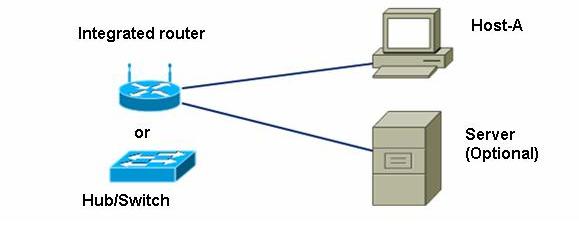
• Komputer harus dilampirkan ke switch penerus yang terintegrasi atau mandiri hub atau switch.
• Opsional, Anda dapat memiliki server yang menjalankan kombinasi dari DHCP, HTTP, FTP, dan Telnet (dikonfigurasi).
Langkah 1: Download dan instal MBSA
a. Buka browser dan pergi ke halaman web MBSA di: http://www.microsoft.com/technet/security/tools/mbsa2/default.mspx
b. Apa itu versi terbaru dari MBSA tersedia?(MBSA 2.2)
c. Apa adalah beberapa fitur MBSA menyediakan?( MBSA 2.2 adalah versi terbaru dari keamanan gratis Microsoft dan penilaian kerentanan scan alat untuk administrator, auditor keamanan, dan profesional TI.
MBSA 2.2 dibangun pada versi 2.1.1 sebelumnya MBSA yang mendukung Windows 7 dan Windows Server 2008 R2 dan memperbaiki masalah kecil yang dilaporkan oleh pelanggan. MBSA akan bekerja dengan didukung semua versi Windows termasuk Windows XP, Windows Server 2003, Windows Vista, Windows Server 2008, Windows 7 dan Windows Server 2008 R2.
MBSA juga kompatibel dengan Microsoft Update, Windows Server Update Services 2.0 dan 3.0, SMS Inventory Tool untuk Microsoft Update (ITMU), dan sccm 2007.
Untuk daftar lengkap produk yang didukung oleh MBSA berbasis Microsoft Update (MU) dan Windows Server Update Services (WSUS) teknologi, kunjungi Produk Didukung oleh halaman WSUS.
Lihat halaman MBSA untuk informasi lebih lanjut atau untuk mendownload versi terbaru.
Kecuali khusus mencatat, semua referensi MBSA 2.0 di halaman TechNet MBSA juga berlaku untuk semua versi MBSA. )
d. Gulir ke bawah halaman dan pilih bahasa yang diinginkan untuk memulai proses download.
e. Klik Lanjut untuk memvalidasi salinan Microsoft Windows yang Anda jalankan.
f. Klik Download File di bawah dan pilih file yang ingin Anda download. (File setup Inggris MBSASetup-EN.msi). Klik tombol Download di sebelah kanan file ini. Berapa banyak megabyte adalah file untuk men-download?(1.7 MB)
g. Ketika Download File - Peringatan Keamanan menampilkan kotak dialog, klik Simpan dan download file ke folder tertentu atau desktop. Anda juga dapat menjalankannya dari situs download.
h. Begitu download selesai, pastikan semua aplikasi lain ditutup. Klik ganda file yang didownload. Klik Run untuk memulai program Setup, kemudian klik Jalankan jika Anda diminta dengan Peringatan Keamanan. Klik Next pada layar Setup MBSA.
i. Pilih tombol radio untuk menerima perjanjian lisensi dan klik Next. Menerima default install berlangsung, dan kemudian klik Selesai. Klik OK pada layar Setup MBSA akhir, dan dekat folder untuk kembali ke desktop Windows.
Langkah 2: Membangun jaringan dan mengkonfigurasi host
a. Hubungkan komputer host (s) ke router yang terintegrasi, hub, atau switch seperti yang ditunjukkan pada diagram topologi. Host-A adalah stasiun pengujian dimana MBSA akan diinstal. Server adalah opsional.
b. Mengatur konfigurasi IP untuk host (s) menggunakan Windows XP Network Connections dan TCP / IP properti. Jika host dihubungkan ke router yang terintegrasi, mengkonfigurasinya sebagai klien DHCP, jika tidak lanjutkan ke Langkah 1d.
c. Jika tuan rumah terhubung ke sebuah hub atau switch dan server DHCP tidak tersedia, konfigurasikan secara manual dengan menetapkan sebuah alamat IP statis.
Yang alamat IP dan subnet mask tidak Host-A dan server (opsional) telah?(192.168.1.101)
Langkah 3: Jalankan MBSA pada sebuah host
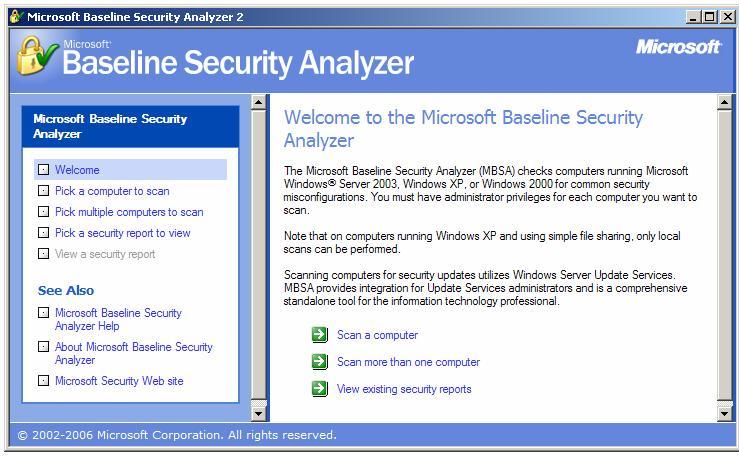
a. Klik dua kali ikon desktop untuk MBSA atau menjalankannya dari Start> All Programs.
Ketika menampilkan layar utama, opsi yang tersedia?
Ketika menampilkan layar utama, opsi yang tersedia?
Langkah 4: Pilih sebuah komputer untuk memindai
a. Di sisi kiri layar, klik Pick komputer untuk scan. Komputer ditampilkan sebagai default adalah salah satu yang MBSA diinstal.
b. Apa adalah dua cara untuk menentukan komputer yang akan dipindai?(dengan workgroup computer name atau lansung aja ke IP adressnya)
a. Di sisi kiri layar, klik Pick komputer untuk scan. Komputer ditampilkan sebagai default adalah salah satu yang MBSA diinstal.
b. Apa adalah dua cara untuk menentukan komputer yang akan dipindai?(dengan workgroup computer name atau lansung aja ke IP adressnya)
c. Terima default komputer akan dipindai. Periksa De-pilih untuk IIS dan kerentanan SQL administrasi, karena layanan ini tidak mungkin yang harus diinstal pada komputer yang sedang dipindai. Klik Start Scan

Langkah 5: pembaruan keamanan Lihat hasil scan
a. Lihat laporan keamanan. Apa hasil dari update keamanan scan??(office security update, windows security update, my SQL security update)
b. Jika ada Xs merah atau kuning, klik Bagaimana memperbaiki hal ini. Solusi mana yang direkomendasikan?(klik” how to connect this” maka jalankan recomendasinya)a. Lihat laporan keamanan. Apa hasil dari update keamanan scan??(office security update, windows security update, my SQL security update)

Langkah 6: Lihat Windows hasil scan dalam laporan keamanan
a. Gulir ke bawah untuk melihat bagian kedua dari laporan yang menunjukkan Windows Hasil Scan. Apakah ada kelemahan administrasi diidentifikasi?
?(tidak complete dalam meng update, dan firewall nya tidak aktif dalam protecsi)
a. Gulir ke bawah untuk melihat bagian kedua dari laporan yang menunjukkan Windows Hasil Scan. Apakah ada kelemahan administrasi diidentifikasi?
?(tidak complete dalam meng update, dan firewall nya tidak aktif dalam protecsi)

b. Pada bagian Informasi Tambahan Sistem layar (di bawah), di kolom Isu untuk Layanan, klik Apa yang dipindai, dan klik rincian Hasil bawah kolom Hasil untuk mendapatkan gambaran dari pemeriksaan yang dijalankan. Apa yang Anda temukan?Setelah selesai, tutup kedua jendela popup untuk kembali ke laporan keamanan (beberapa potensial keamanan tidak bisa diinstal maka untuk recommendasi coba lagi)

b. Berapa banyak produk Microsoft Office yang diinstal?(10)
c. Apakah ada masalah keamanan apapun dengan Makro Keamanan untuk salah satu dari mereka?(ada)
Langkah 8: Scan server, jika tersedia
a. Jika server dengan berbagai layanan yang tersedia, klik Pick komputer untuk memindai dari layar MBSA utama dan masukkan alamat IP dari server, dan kemudian klik Start Scan. kerentanan keamanan yang telah diidentifikasi?(IE zone)
Langkah 8: Scan server, jika tersedia
a. Jika server dengan berbagai layanan yang tersedia, klik Pick komputer untuk memindai dari layar MBSA utama dan masukkan alamat IP dari server, dan kemudian klik Start Scan. kerentanan keamanan yang telah diidentifikasi?(IE zone)
b. Apakah ada layanan berpotensi tidak perlu diinstal? Yang nomor port yang mereka pada?
(ada)
(ada)
Langkah 9: Uninstall MBSA menggunakan Control Panel Add / Remove Programs
a. Langkah ini adalah opsional, tergantung pada apakah tuan rumah akan secara otomatis dikembalikan kemudian oleh proses jaringan.
b. Untuk uninstall MBSA, klik Start> Control Panel> Add / Remove Programs. Cari aplikasi MBSA dan uninstall itu. Ini harus tercantum sebagai Microsoft Baseline Security Analyzer 2.0.1. Klik Hapus, kemudian klik Ya untuk mengkonfirmasi penghapusan aplikasi MBSA. Setelah selesai, tutup semua jendela untuk kembali ke desktop
Langkah 10: Refleksi
a. MBSA Alat ini dirancang untuk mengidentifikasi kerentanan untuk komputer berbasis Windows. Cari di Internet untuk alat lain yang mungkin ada. Daftar beberapa alat ditemukan.
a. MBSA Alat ini dirancang untuk mengidentifikasi kerentanan untuk komputer berbasis Windows. Cari di Internet untuk alat lain yang mungkin ada. Daftar beberapa alat ditemukan.
isinya:

Isinya:
See also:
· Nessus - Security scanner for Linux, BSD, Solaris, and other flavors of Unix. Performs over 900 remote security checks, and suggests solutions for security problems.
· Nmap - Developers of NMAP, a network port scanner and service detector offering stealth SYN scan, ping sweep, FTP bounce, UDP scan and operating system fingerprinting. Downloads, documentation, security tools directory and a mailing lists archive. [Windows, MacOS, Unix]
· Acunetix Web Vulnerability Scanner - Scans for common security vulnerabilities such as SQL injection, cross site scripting and other web vulnerabilities.
· Angry IP Scanner - A freeware IP scanner for Windows. Display NetBIOS information, MAC address; save result to CSV, TXT, HTML or XML file.
· AppDetective - Penetration testing scanner that locates and assesses the strength of databases and web applications within your network.
· Attack Tool Kit Project - An open-source utility to realize vulnerability checks and enhance security audits.
· Auto IP Scanner - Scan your PC for open ports ( Http, Https, Ftp, Dns, MySql, Imap, Smtp, Pop, Dc++, Irc).
· AutoScan - Am application designed to explore and to manage your network. Entire subnets can be scanned simultaneously without human intervention. OS detection, automatic network discovery, a port scanner, a Samba share browser, and the ability to save the network state.
· Beyond Security - Vulnerability assessment of internal networks or Intranets using an automated scanning server.
· CXL Ltd. - Provides details of AZScan, a non-intrusive software tool which will review the security Oracle and Unix, OS400 and OpenVMS systems.
· Cum Security Toolkit (cst) - Contains a cgi script scanner with 11 anti-IDS tactics and +2200 vulnerable scripts in the database; and a port scanner with banner grabber.
· DominoDig - Audits Lotus Domino web servers. Produces an HTML report that provides a list of all the unique .nsf databases it was able to access, as well as IP addresses and email addresses.
· Filterrules - Description and download of the GPL-licensed firewall testing and documentation tool.
· FusionVM Enterprise - FusionVM from Critical Watch automates the process of proactively managing network vulnerabilities and exposures. It enables a unified corporate process that is enterprise-wide, repeatable and measureable.
· GFI LANguard - Provides information such as service pack level of the machine, missing security patches, open shares, open ports, services/applications active on the computer, key registry entries, and weak passwords. Remotely install security patches and service packs.
· Gherkin - Free security scan manager incorporating Nessus vulnerability scanning, dns and nmb lookup, host resolving, and nmap fingerprinting and scanning.
· HFNetChkPro - Patch management tool scans Microsoft servers and desktops. Schedule and immediate remote patch scans and installations. Freeware and command-line versions available.
· IIS Vulnerability Scanner ver 1.0 - Contains 1700+ server and file checks including hundreds of unicode and directory traversal vulnerability checks for IIS.
· IP Range Scanner - This tool enables the user to retrieve a list of computer host names, logon account names, MS IIS service status, and/or determine the use of non-LocalSystem accounts (used to start services).
· ISS - Internet Scanner Tool. Performs scheduled and selective probes of communication services, operating systems, applications and routers to uncover and report systems vulnerabilities that might be open to attack.
· Infiltration Systems - Network security scanning software for detecting, auditing, and fixing network security exploits and vulnerabilities.
· Inguama - A free penetration testing and vulnerability discovery toolkit entirely written in python.
· Joomla! Security/Vulnerability Scanner - Signature based scanner that can detect Joomla vulnerabilities.
· MaxPatrol Security Scanner - Network security and web-application scanner with prediction capabilities.
· MegaPing scanner - TCP and UDP portscanner and NetBIOS scanner, Displays installed service packs, open TCP and UDP ports, missing security patches.
· N-Stealth Security Scanner - Vulnerability-assessment product that scans web servers to identify security problems and weaknesses on local and remote web servers. Commercial and free editions are available.
· NGSSoftware - Security scanners and assessment tools for Oracle, Domino, and SQL Server. Checks for weak passwords and vulnerability to SQL injection and cross-site scripting.
· NScan - It includes network/host scanner, a set of additional features currently limited to whois and traceroute and numerous options to fully customize the scan process.
· Network Analyzing - Network scanning and auditing software which scans your network or webserver for over 20,000 exploits.
· Network Scanning Software - Network scanning and auditing software which scans your network computers for vulnerabilities, exploits, and information enumerations.
· Network Security Audit Tools and Vulnerability Scanner - Network security and vulnerability scanner, password and product key recovery software.
· Nikto - A web server scanner which performs tests against web servers for multiple items, including over 2200 potentially dangerous files/CGIs, versions on over 140 servers, and problems on over 210 servers.
· Online Vulnerability assessment ASP with graphical network display, updated daily - Online vulnerability scanner which scans for SANS "top ten" vulnerabilities.
· PCMantra - Registry Cleaner, Anti Spyware - Offers privacy software for disk management and registry cleaning, anti-spyware and spam filter. Downloads and online sales available.
· PatchQuest and ScanFi - Automated patch management and vulnerability assessment software for scanning, distributing and managing patches, security hotfixes and updates across heterogeneous networks comprising Windows, Red Hat and Debian Linux systems.
· PivX Solutions Inc - Offer vulnerability and malware scanning software products for home and enterprise users.
· Portswigger.net - Web application security testing software. Product details, downloads, how to order and screenshots.
· Powerfuzzer - A highly automated web fuzzer. It is capable of spidering website and identifying inputs.
· Proactive Windows Security Explorer - A password security test tool that's designed to identify and close security holes by executing an audit of account passwords, and exposing insecure account passwords.
· Rapid7 - A vulnerability assessment and compliance solution that scans applications, databases, networks, and operating systems.
· Retina Network Security Scanner - Identifies security vulnerabilities, suggests appropriate corrective actions and fixes. Free MyDoom, Nimda, DCOM, Sapphire SQL Worm, and Nimda scanner downloads.
· SQL Server 2000 Security Tools - Microsoft tool scans for instances of MS SQL Server 2000 vulnerable to the "Slammer" worm, and then apply updates to the affected files. Includes SQL Scan, SQL Check,and SQL Critical Update.
· Securescout perimeter penetration testing - Tests are performed over the Web to Internet-connected systems.
· SecurityMetrics Appliance - Network Scanner - Vulnerability Assessment, Intrusion Detection and Prevention.
· Shadow Security Scanner - Offers vulnerability auditing modules for many systems and services. These include: NetBIOS, HTTP, CGI and WinCGI, FTP, DNS, DoS vulnerabilities, POP3, SMTP, LDAP, TCP/IP, UDP, Registry, Services, Users and Accounts, password vulnerabilities, publishing extensions, MSSQL, IBM BD2, Oracle, MySQL, PostgressSQL, Interbase, and MiniSQL.
· SourceForge.net: Gamja : Web vulnerability scanner - Scans for XSS(Cross site scripting) and SQL Injection.
· Spectator scanning tool - Scans Windows NT/2000/XP/2003 machines for P2P applications, remote-control applications, service packs, etc.
· SuperScan, SQLScan, BOping - Several security scanners, including a portscanner, a scanner for the Back Orifice, a scanner for Microsoft SQL Server "Slammer" Worm.
· TrustSight Security Scanner - Cross-Site Scripting, SQL Attacks,OS Attacks, Directory Traversal, cookie manipulation are tested. Claims not only to be able to find not only known vulnerabilities, but also potential new ones. CVE Compatible.
· Visionael Security Audit - Software providing device discovery, scanning, prioritization, and report generation of vulnerabilities.
· Vulnerability Scanning Cluster Project - A web-based interface for the Nessus vulnerability scanner and a backend queue manager for scan requests. Allows users to hierarchically manage networks of hosts, scanning policies, and automated scans.
· Wapiti - Web application security auditor - Wapiti acts like a fuzzer, injecting payloads to see if a script is vulnerable.
· Web Security - Jamesmaurer.com - Offers online security testing and provides a list of privacy tools to help make internet travels safer.
· Wikto Web Assessment Tool - Web server fingerprinting, directory and link extraction, Nikto and Google Hack DB scans.
· load balancer detector - Halberd discovers HTTP load balancers. May be useful for testing load balancer configurations and for web application auditing purposes.
· nCircle IP360 Vulnerability Management - An appliance-based solution that proactively discovers and assesses network vulnerabilities and exposures to protect networks and IP-enabled devices.
· sqlmap: a blind SQL injection tool - SQL scanner capable of enumerating entire remote databases, and perform an active database fingerprinting.
· Product Review: Acunetix Web Vulnerability Scanner - A review of the Acunetix web vulnerability scanner. (August 11, 2005)
· Vulnerability Scanner Review - Network Computing's review of several commercial and open-source Vulnerability Assessment Scanners. (January 08, 2001)
b. Alat yang mungkin ada untuk komputer non-Windows? Cari di Internet untuk alat lain yang mungkin ada dan daftar beberapa di sini.
Jawabannya diatas
c. Langkah-langkah lain yang bisa Anda ambil untuk membantu mengamankan komputer terhadap serangan internet?
1. Mengupdate anti virus
c. Langkah-langkah lain yang bisa Anda ambil untuk membantu mengamankan komputer terhadap serangan internet?
1. Mengupdate anti virus
2. mengaktifkan tools untuk proteksi atau scan (tune-up)
3. pakai antivirus local juga
4. pakai anti virus internasional yang khusus untuk keamanan dalam berinternet.
Langganan:
Postingan (Atom)